

PRODUCT
What is WeBuild?
WeBuild is a cloud-based construction management platform designed specifically for commercial contractors. From the office to the field, it puts you in complete control of your projects—from bidding/tendering to completion.
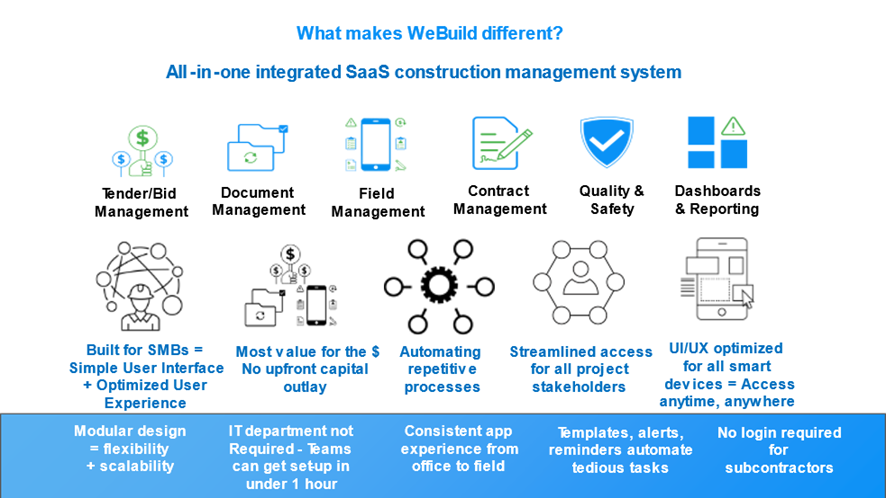
With real-time collaboration, your team and project partners can access tools for Document Control, Field Management, Contract Management with Quality & Safety features. Our modules are fully integrated so they can be used together seamlessly on each project.
What are the components of the WeBuild software?
The software’s components are:
- Bid/Tender management
- Document management
- Field management
- Contract management
- Quality and safety
- Dashboard and reporting
What are the system’s special design features?
The system design supports simple, streamlined workflows and automation:
- Accessible anytime, anywhere and on all smart devices.
- Mobile iOS/Android apps optimized for all smart devices.
- Clean-cut design = simple User Interface + optimized User Experience.
- Real-time collaboration and decision making.
- Consistent app experience from the office to the field.
- You pay only for your internal team members registered to use the system.
- Free access for all other project stakeholders external to your company.
- No WeBuild account / login required for your sub-contractors.
- Templates, alerts and reminders to automate repetitive processes and tedious tasks.
- Transmittal emails, messages and project-related items are branded to your company.
- Excellent customer support.
What makes WeBuild different?
Who can use WeBuild?
WeBuild can be used by any team of construction professionals involved in overseeing all or part of a project in any capacity.
WeBuild’s functionality caters to many project roles, including:
- Owners/developers
- Project managers
- Construction managers
- Contracts administrators
- Estimators
- Site managers
- Sub-contractors
- Suppliers
- Architects
- Engineers
- Designers
Does WeBuild require any training?
Our intuitive, user-friendly interface allows new users to learn as they click through their account. If you need more guidance, our friendly Support Team is on hand to assist you. Please email us at [email protected].
GETTING STARTED
Do I need to install any software on my computer?
No. WeBuild is a completely web-based program, so there is no need to install any software. All you need is an internet connection and you get instant access in your browser or mobile device. We handle all the updates and maintenance daily, and you just focus on managing your business.
How do I create my company account?
Our intuitive, user-friendly interface allows new users to learn as they click through their account. We also recommend that you see the section “Starting your NEW account (Step-by-step instructions)”. If you need more guidance, our friendly Support Team is on hand to assist you. Please email us at [email protected].
Our company has offices in multiple locations. Is it possible to create separate branches under the same company name?
If your company has a separate business or branch and you need to create a separate account for this business or branch, you will need to go through the same steps of registering a new account as if you are registering a new company.
You will need to use a different email address to create an account for the new business or branch of your company, in order for the system to log you into the correct account.
It is also important to include a different Office Name (e.g. New York office) for this business or branch as well as address and other information to distinguish the account of this business or branch from the other accounts of your company.
Which branch category should I choose?
Selecting a branch type helps us tailor your account to your needs. There are three branch types to choose from:
- Owners and consultants – Your company primarily manages and consults with general contractors on a project.
- General contractors and developers – Your company is regularly engaged by owners to manage or oversee the management of an entire project. This includes working with consultants and managing sub-contractors and suppliers.
- Sub-contractors and suppliers – Your company bids for work/supply associated with your speciality trade.
What is the difference between collaboration account and a management account?
The answer is project control.
If your company manages project documentation, engages other companies for procurement or consultancy services and oversees day to day site operations, your team will require a Management account.
As a holder of a Management account, you can upload unlimited number of projects on the system, have unlimited access to all the features we offer and have complete control over project access that you give to other companies working on your project.
On the other hand, if your company is engaged by the main contractor/project manager to work as a sub-contractor or provide consultancy services for a certain aspect of a project, you can connect with the project by creating a free Collaboration account.
MANAGEMENT
How do Management accounts work?
Management accounts allow companies to create an unlimited number of projects to manage during the design, pre-construction, and construction phases. Each Management account utilizes WeBuild’s functionalities to manage the bidding/tendering process, project documentation, field management, contract management and Quality & Safety.
All external companies that you invite to collaborate on your projects can have access to the latest project information as granted by the holder of a Management account:
- Through their free optional Collaboration account with WeBuild, or
- Work via our system’s Smart Emails without the need to have a WeBuild account. Many sub-contractors and suppliers prefer this feature.
What if companies working on my project do not want to create a WeBuild Collaboration accounts?
Collaboration accounts are free of charge for companies working on your project (e.g. sub-contractor and suppliers) and are also completely optional. If a sub-contractor prefers not to create a Collaboration account, they can receive, action and respond to everything that you send to them via our Smart Emails.
When a sub-contractor replies to your Smart Email, you will receive a notification and all correspondence will be saved and displayed in the corresponding area of the project for your record.
Can my company be invited to collaborate on another company’s project with a Management account?
Yes, you can be invited to collaborate on another company’s project whether you have a WeBuild Management account or a free WeBuild Collaboration account.
COLLABORATION
How do Collaboration accounts work?
So, you have registered your company and added all your team members to your free Collaboration account, what next?
In order to make use of your Collaboration account’s functionality, you must first be invited to a project by the project owner/manager who has a Management account.
Once you are given access to a project, you will be able to use your Collaboration account to view the project documentation shared with you (subject to the access level you are granted), submit a quote (if invited to a bid/tender package) and interact with all the various management features for the duration of the project.
Can I upgrade my company’s Collaboration account to a Management account?
Yes. If your company decides to use the WeBuild platform to manage its own projects, your Collaboration account can be easily upgraded to a Management account by creating a new project and selecting the right pricing package for your business.
If you would like to know more, please feel free to email us at [email protected].
PRICING
Is there a limit to the amount of data we can store within our account?
No, there is no limit to the amount of data that can be stored for each of your projects.
Are there any charges for support?
General technical support is free for our clients’ teams and for the companies collaborating with them on their projects. Clients’ requests for specific enhancements or additions to the platform to meet special business needs will be considered and an estimated cost will be provided.
What is the standard contract period for my subscription?
WeBuild’s subscription is for a 12-month commitment (subject to the Terms and Conditions) and the cost is based on the number of user licenses required for your own internal staff members.
What users do I have to pay for?
You pay only for the number of user licenses required for your own internal staff members. All external companies are able to collaborate with you on your projects free of charge.
WeBuild Support
Our email support enables us to provide the most prompt and efficient support services for our clients due to the different time zones in which our platform is used. All emails are responded to within 24 hours, and all urgent matters are attended to immediately.
Accounts Support: [email protected] Technical Support: [email protected]

